Guide
How to remove Google reviews: what a business can and can't take down
You can't delete a review yourself. You can report it, appeal once, reply, or ask the reviewer.
No card needed, First reviews in 48hr, 15-min setup call

A business can't delete a Google review. The person who wrote it can edit it or delete it (Google Maps Help). Google can remove it too, for example when it breaks Google's content policy. What you can do is report it. If it breaks the policy, Google takes it off Maps and Search (Google's page on reporting reviews). If Google leaves it up, you can appeal once. You can also reply to it, or ask the customer to change it. So Google reviews can be deleted, but only by the reviewer or by Google, never by the business.
Who can take a Google review down
Here's who can do what with a review on your profile, from Google's own pages. Our guide on whether a business can delete Google reviews goes deeper on the owner's side.
| Who | What they can do | Google's page |
|---|---|---|
| The person who wrote it | Can edit it or delete it. It stays up until they take it down. | Google Maps Help |
| Removes reviews that break its content policy. | Report inappropriate reviews | |
| Google, for legal reasons | Has its own form for content you believe breaks the law. | Report content for legal reasons |
| You, the business owner | Can't delete it. Can report it, appeal, reply, or ask the reviewer to change it. | Manage customer reviews |
Checked on November 17, 2026.
What Google removes, and what it leaves up
You check your profile between jobs and see one star from a name you don't know.
Google removes a review when it breaks one of its policies. A harsh review isn't enough by itself.
Google's page on reporting reviews asks owners not to report a review just because they dislike it. Disagreeing with it isn't a reason either. The page also says: "Google doesn't get involved in conflict between businesses and customers."
So a bad review from a real customer, about a real job, will most likely stay up. That's true even when you'd tell the story another way.
Google also says a bad review isn't always a sign of poor service. It can point to something worth fixing.
Reviews that do break the rules come down in big numbers. Google says it blocked or removed over 292 million policy-violating reviews in 2025 (New ways we're protecting businesses on Maps, Google, April 16, 2026).
The table below shows what counts as breaking the rules.
Reviews that break Google's rules
These come from Google's Maps user content policy (Prohibited & restricted content), checked on November 17, 2026. The right column puts the policy in plain words.
| The review | What Google's policy says |
|---|---|
| Left by a competitor | No one may post on a competitor's business to hurt its reputation. |
| Written by someone with a conflict of interest | That can mean a current or former employee, or someone under contract with the business. |
| Not based on a real experience | A review has to come from a real experience and show the business accurately. |
| Fake reviews or spam | Google calls this fake engagement. It isn't allowed, and Google removes it. |
| Off-topic | No general, political or social commentary, and no personal rants. |
| Harassment, threats, hate speech, private information shared without consent, dirty words, or pretending to be someone else | Each one is on Google's list of banned content. |
If a review is real and on topic, it usually doesn't qualify, however unfair it feels.
Some of these cases have a guide of their own. Start with how to remove fake Google reviews. We also cover a review from someone who was never a customer, and a review left by a competitor.
How to report a Google review
You report a review from your Business Profile. These steps follow Google's page on reporting reviews, checked on November 17, 2026.
Open your profile.
Go to your Business Profile.
Open your reviews.
Select Read reviews.
Find the review.
Select Report next to the review you want Google to look at.
Pick the reason.
Choose the reason on Google's list that fits the rule it breaks. The list uses shorter names than the table above. For a competitor or a former employee, pick Conflict of interest. For a fake review, pick Spam. Disagreeing with a review isn't a reason Google acts on.
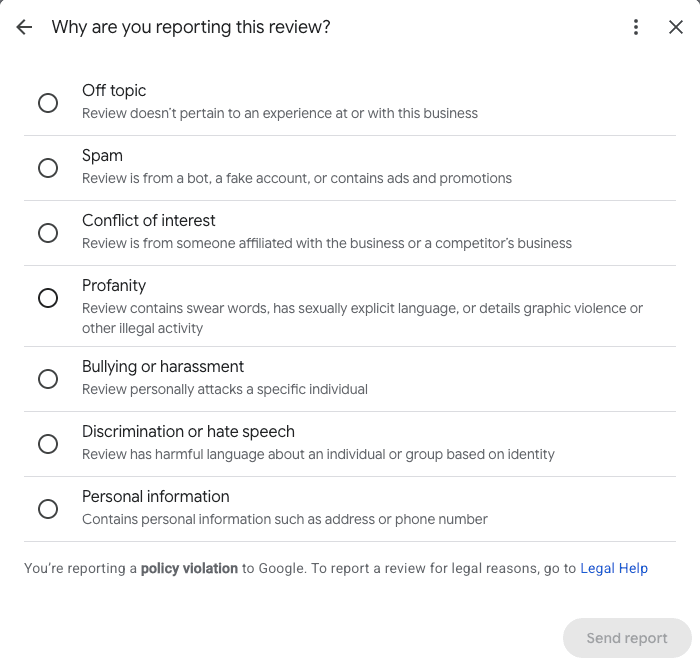
Send it.
Select Send report.
On an Android phone, you can also report from the Google Maps app. Find the review and tap More. Then tap Report review and pick a reason. These are Google's Android steps (Google Maps Help, Android steps).
On an iPhone or iPad, the Google Maps app works the same way. Find the review and tap More. Then tap Report review and pick a reason (Google Maps Help, iPhone and iPad steps).
Google's Android steps name one more option: Not helpful. It doesn't report the review. Google just shows that review to fewer people. To get the review looked at, pick Report review.
What happens after you report a review
- Report sent. Google starts to look. This typically takes several days.
- Decision pending. Google hasn't decided yet.
- Decision. If the review breaks a policy, it no longer shows on Maps and Search. If not, the status says Report reviewed - no policy violation.
- One appeal. If the review stays up, you can appeal once.
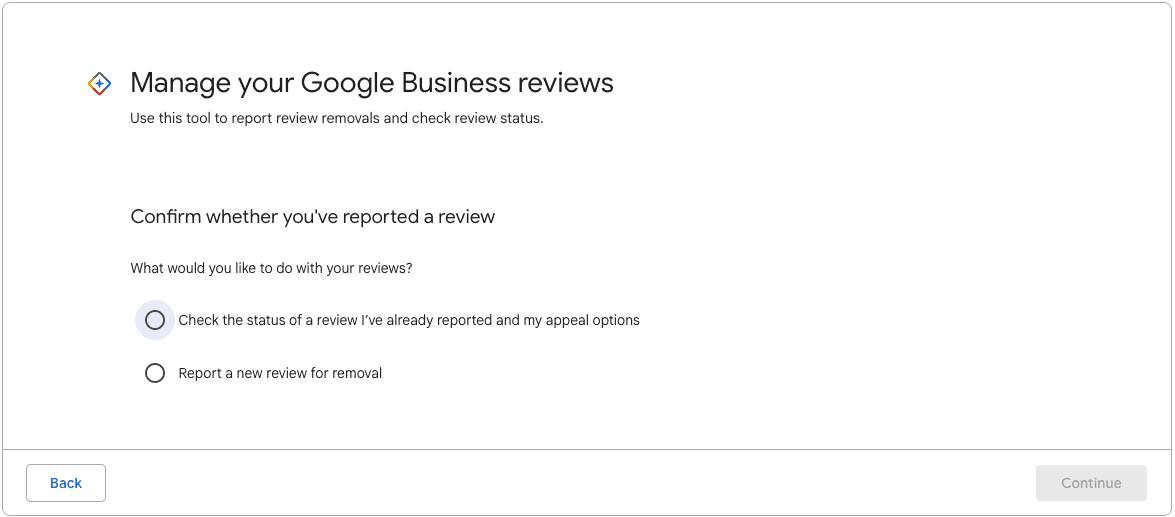
Check where your report stands in Google's Reviews Management Tool. Google says it's for reporting reviews for removal and checking their status.
Google's page on reporting reviews says one appeal can cover up to 10 reviews.
Before you appeal, make sure you can name the rule the review breaks.
After you appeal, the status can say Escalated - check your email for updates. Google says that means your appeal was escalated, and you'll get an email about the final decision (Google's page on reporting reviews, checked on November 18, 2026). The label still shows on a review that Google leaves up after the appeal. If you see it, watch your inbox.
If Google says no, our guide on why Google won't remove some fake reviews covers the reasons a report fails.
Reply to the review while you wait
Your reply is the part of a review you control.
Your business has to be verified before you can reply. Google checks each reply first. That usually takes up to 10 minutes, and sometimes up to 30 days (Google's page on managing reviews).
Google tells the reviewer about your reply. They can still edit their review, and its date then updates.
Google's tips page says helpful replies and following up on concerns can show you care. It says they may even lead the customer to update the review (Tips to get more reviews).
If the problem is complex, Google suggests asking the reviewer to call or email you. That way you can sort it out in private. Never share their private information, and never attack them personally.
For the whole route, see our guide on how to get rid of bad Google reviews.
If someone uses bad reviews to ask for money
Google says these scams may start with a sudden run of 1-star and 2-star reviews on a profile. Then someone demands money, goods or services to remove them. Google calls this a negative review extortion scam. It treats it as a serious policy violation and has its own report for it (Google's page on extortion scams, checked on November 17, 2026).
Don't reply, and don't pay.
Google says not to engage with these people or pay them. Don't offer money or free work to settle it either.
Take screenshots.
Save every message and demand. Where you can, show the date, the time and the sender's contact details.
Send Google's report.
Use Google's extortion report, and attach your screenshots and files.
Wait for Google's answer.
Google looks into the claim and tells you what it found.
Ask the customer to change it, with nothing in return
If Google won't take a review down, the person who wrote it still can. They can edit it or delete it. If the review is about a real job, fixing the problem and asking is a fair route. The steps below are our advice. Where Google has a rule, we link it.
- Fix what went wrong. Do that first, so you have something new to tell them.
- Ask once, in plain words. Ask if they'd be willing to update the review. For the words, see how to ask the customer to remove the review.
- Offer nothing for it. No money, no discount, no free service. Google strictly prohibits incentives for changing or removing a review (Tips to get more reviews).
- Don't push. One polite ask is enough, and never a threat.
- Take no for an answer. If they say no, the review stays up, and so does your reply.
More new reviews make one bad review count for less
Your review score is the average of all the ratings published on Google for your business (Understand review scores). So every new rating changes it. The more ratings you have, the less one bad one moves the average.
BrightLocal surveyed 1,002 US adults through an online panel for its Local Consumer Review Survey 2026, published February 11, 2026. In that survey, 68% said they only use a business with 4 stars or more. For 31%, the bar was 4.5 stars or more, up from 17% the year before. Only 10% said they only use a business with a 5-star rating. For most of the people asked, the bar was at least 4 stars, not a perfect 5. These are BrightLocal's findings, read November 17, 2026.
People ask how many 5-star reviews it takes to cancel out a 1-star. There's no set number. It depends on how many reviews you have now and what your score is.
See how many 5-star reviews it takes to reach your goal, or check your review pace, free.
What Google does to a profile with fake reviews
Don't try to bury a bad review under fake good ones. When Google finds fake reviews on a profile, it can restrict that profile (Business Profile restrictions for policy violations, checked on November 17, 2026). The page gives no length for the set period below. Google's content policy adds that it may suspend or end accounts that break it.
- The profile can't get new reviews or ratings for a set period.
- Its existing reviews and ratings can be unpublished for a set period.
- The profile can show a warning that fake reviews were removed.
- The business can appeal the decision.
Guides for fake, non-customer and competitor reviews
- How to remove fake and spam Google reviews. It lists what Google counts as fake or spam, from paid reviews to one person posting from several accounts. It also says what Google's own systems do about fake reviews.
- Why won't Google remove fake reviews? It explains how Google checks a reported review, and why a review that feels fake can still stay up. Its table pairs what you might see with Google's policy line and a next step.
- How to remove a Google review from a non-customer. Its first step is a check of your job records: names, streets, job dates and quotes that never booked. What you find tells you which route the review needs.
- How to remove a Google review left by a competitor. It names signs that a rival may have written the review, and what to write down before you report. It also shows how to reply without naming the rival, and why not to hit back.
Guides for bad reviews from real customers
- How to get rid of a bad Google review. A table sorts bad reviews into the ones to report and the ones to reply to. It also covers what not to do, and gives a sample reply to a fair bad review.
- How to ask a customer to remove a bad Google review. The five steps go in order, from your public reply to the customer's answer. A sample text and email are ready to copy. It also lists the taps your customer uses to edit or delete the review.
- Can a business delete Google reviews? It sets out what your Business Profile can and can't do with a review. Other parts cover why a review can vanish, and what removing your profile does to reviews and replies.
Keep new reviews coming after every job
No fake reviews. We ask every customer the same way.
That's how good reviews end up beside a bad one: real customers, asked after real jobs.
Here's what we do today. When a job is marked done in your CRM, we text that customer. The text has a photo of someone on your team holding a whiteboard with the customer's name. It also has the link to your Google review page.
The text usually goes out within an hour of the job closing, and only during set hours. We recommend one request right after service and up to two gentle reminders. The follow-ups stop once the customer reviews.
Setup is one 15-minute call. Once your CRM is connected, the texts start. On average, the first new Google reviews come in about 48 hours after that.
$150 a month covers up to 100 review requests. A reminder doesn't count as one of the 100. See pricing.
See how it works. If you ask by hand, use our tips on what to say when you ask. Our guide on how to get more Google reviews has more ways to keep them coming.
I built ReviewsOS for my own insulation company first. My first run there went to past customers.
These are our own numbers, not figures from an outside study.
About 30% of new customers typically post a review
Over 50% at some companies
35 Google reviews in 14 days, my insulation company's first run
Questions owners ask about removing Google reviews
Do I have to pay a company to remove a review?
No. You can report the review yourself, and appeal once if Google leaves it up (Google's page on reporting reviews). Only the person who wrote it or Google can take a review down. So a company you pay can't delete it either. It can only go to Google through the same routes you have. Someone behind bad reviews may ask you for money to take them down. Google treats that as an extortion scam. Follow the extortion steps above.
How long does Google take to look at a reported review?
Google says it typically takes several days. You can follow the status in the Reviews Management Tool. Google's pages give no time for an appeal.
Can a removed review come back?
Not if Google removed it for breaking a policy. Google's Maps help page says it won't put those reviews back.
Can Google take down a real review by mistake?
Yes, sometimes. Google's page on reporting reviews says its system may now and then remove real reviews by mistake.
What if I think a review breaks the law?
Google has a separate form for content you believe breaks the law or your rights. Before you use it, Google asks you to flag the content in the product where it shows. For a review, that means reporting it first.
How do I delete a review I wrote?
If you wrote the review, you can edit it or delete it. It stays up until you take it down. Google Maps Help has the steps for a computer and for Android. On an iPhone, open Google Maps and tap Contribute, then View your profile and See all reviews. Next to the review, tap More, then Delete review (Google Maps Help, iPhone and iPad steps).
Sources
- Report inappropriate reviews on your Business Profile, Google Business Profile Help, read November 17, 2026
- Add, edit, or delete Google Maps reviews & ratings (computer), Google Maps Help, read November 17, 2026
- Add, edit, or delete Google Maps reviews & ratings (Android), Google Maps Help, read November 17, 2026
- Add, edit, or delete Google Maps reviews & ratings (iPhone & iPad), Google Maps Help, read November 17, 2026
- Prohibited & restricted content (Maps User Generated Content Policy), Google, read November 17, 2026
- Manage customer reviews, Google Business Profile Help, read November 17, 2026
- Tips to get more reviews, Google Business Profile Help, read November 17, 2026
- Report negative review extortion scams on your Business Profile, Google Business Profile Help, read November 17, 2026
- Business Profile restrictions for policy violations, Google Business Profile Help, read November 17, 2026
- Understand review scores for local places & businesses, Google Business Profile Help, read November 17, 2026
- Report Content for Legal Reasons, Google Legal Help, read November 17, 2026
- Manage your Google Business reviews (Reviews Management Tool), Google, read November 17, 2026
- New ways we're protecting businesses on Maps, Google blog, published April 16, 2026, read November 17, 2026
- Local Consumer Review Survey 2026, BrightLocal, a panel of 1,002 US adults via SurveyMonkey, published February 11, 2026, read November 17, 2026
We’ll get you 10 Google reviews for free to prove it works.
We start with the customers you've already served.
No card needed, First reviews in 48hr, 15-min setup call
Or see it first: get the text your customers will get.