Removing Google reviews
A business can't delete Google reviews, only its own replies
Only the person who wrote a review can delete it. You can reply, report it to Google, and appeal once.
No card needed, First reviews in 48hr, 15-min setup call

No. You can't delete or edit a customer's Google review, even on your own Business Profile. Editing and deleting are the reviewer's own controls (Google Maps Help). What you can do is reply, delete your own reply, and ask Google to remove the review. Only reviews that break Google's policies can be removed (Google's page on reporting reviews, checked on November 17, 2026). Our guide on how to delete Google reviews covers every way to get one taken down.

What your Business Profile can and can't do with a review
Here's what you can do with a review on your profile, and what's left to the reviewer or to Google.
| What you want to do | Can you? | What Google's page says |
|---|---|---|
| Delete a customer's review | No | Only the person who wrote the review can delete it |
| Edit a customer's review | No | Editing is the reviewer's control too |
| Reply to the review | Yes | Once your business is verified. The reply shows as your business, not your name |
| Delete your reply | Yes | You can delete your reply from your profile |
| Report the review to Google | Yes | Google checks it against its policies |
| Appeal if Google keeps it | Once | One appeal, and you can pick up to 10 reviews in it |
| Offer the reviewer something to take it down | No | Google bans offering money, discounts, free goods or free services to get a negative review changed or removed |
From Google's help pages on Maps reviews, managing reviews, reporting reviews and its review policy, checked on November 17, 2026.
Your reply is the part you control
When you reply to a review, Google tells the person who wrote it. Google's page on managing reviews puts it this way: "Customers can still change their review after reading your reply."
If the customer edits the review, the date of that edit shows as the review's post date (Google Maps Help).
Your reply goes public under the review once Google approves it. That usually takes up to 10 minutes, but it can take up to 30 days (Google's page on managing reviews, checked on November 17, 2026). Since the reply is public, anyone who reads the review can read your side too.
Only the customer can delete the review. So the other route is to ask a customer to take a review down. Google's policy bans offering anything in return, like money or a discount (Google's review policy).
Google decides which reported reviews come down
You can report any review. But only reviews that break Google's policies qualify for removal, which is why Google refuses some requests.
Google's report page says: "Do not report a review just because you disagree with it or dislike it." It adds that a negative review isn't always a sign of poor service. And Google says it doesn't get involved in disputes between a business and its customers (Google's page on reporting reviews, checked on November 17, 2026).
Our guide on how to remove a bad Google review has the full report steps. Here's what happens after you send a report in.
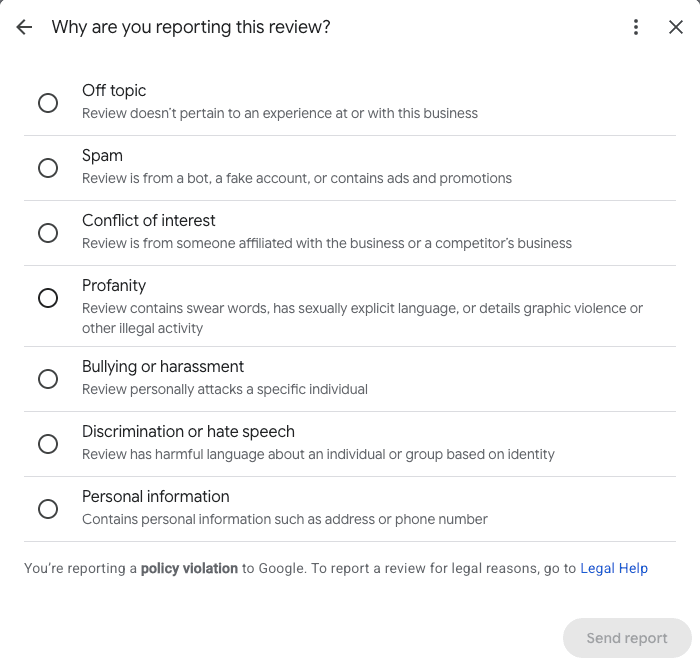
- Reported. Flagged but not checked yet. You see its status in the Reviews Management Tool.
- Checked. Google's check typically takes several days.
- Removed or kept. A review that breaks a policy comes off Maps and Search. One that doesn't stays live.
- One appeal. If the review stays, you can appeal once, with up to 10 reviews.
- Final decision. Once your appeal is escalated, Google emails you its final decision.
Why a review can vanish from your profile
Usually, a review goes missing because Google removed it for breaking a policy, like spam or inappropriate content. Google may also turn off reviews for a while on some Business Profiles or kinds of business. It says that's to protect business owners. And reviews removed for breaking a policy won't be restored (Google's page on missing or delayed reviews, checked on November 17, 2026).
Google's system can also get it wrong. Google's report page says the system sometimes removes real reviews by mistake.
If you reported the review yourself, the Reviews Management Tool shows where your report stands (Google's page on reporting reviews).
Removing your profile doesn't remove the reviews
If you remove your Business Profile from your Google Account, the customer reviews stay. What goes is your own content: your posts, photos, videos and review replies. Google says those are removed for good (Google's page on removing a Business Profile, checked on November 17, 2026).
Your business might still show up on Search and Maps after that, too.
So taking the profile down deletes your side of the story and keeps theirs.
What backfires when you try to make a review go away
Some ways to make a bad review go away break Google's rules or make things worse. Google warns about the two below. The safe route is to get more reviews from real customers, so one bad rating counts for less. See how many 5-star reviews it takes to reach your goal.
- Paying someone who demands money to remove bad reviews. Some people post bad reviews, then demand money, goods or services to remove them. Google says not to engage with them or pay. Paying can bring more attempts, and it doesn't guarantee the reviews come down. Report it on Google's merchant extortion report form (Google's page on review extortion scams, checked on November 17, 2026).
- Posting fake reviews to bury it. Google lists what it can do to a profile with fake reviews. It can stop the profile from getting new reviews or ratings for a set period. It can unpublish the profile's existing reviews for a set period. And it can show customers a warning that fake reviews were removed (Google's page on Business Profile restrictions, checked on November 17, 2026).
A removal company can't delete a review for you
The Google help pages we read give the delete control to one person: the reviewer (Google Maps Help). Google can remove a review after a report. But only reviews that break its policies can be removed, no matter who reports them (Google's page on reporting reviews, checked on November 17, 2026). Neither page gives a removal company a way of its own.
The Google help pages we read don't list a price for reporting. You report a review yourself, from your own Business Profile. If you pay a company to report it for you, Google's rule stays the same.
The steps Google gives you are ones you can take yourself: reply, report, and appeal once if Google keeps the review.
Your score is the average of every rating
A bad review you can't delete is still one rating among all your others. Your review score is the average of all the ratings on Google for your business (Google's page on review scores, checked on November 17, 2026). So each new review makes that one rating count for a little less.
Here's how we help you get those new reviews. When a job is marked done in your CRM, we text that customer. The text has a photo of someone on your team holding a whiteboard with the customer's name. The photo gets their attention. Then the text asks for the review and links to your Google review page. We ask every customer the same way. See how it works.
$150 a month covers up to 100 review requests. See pricing. If you'd rather send the link yourself, make your free Google review link.
I built ReviewsOS for my own insulation company first. These are our own numbers, not figures from an outside study.
About 30% of new customers typically post a review
Over 50% at some companies
35 Google reviews in 14 days from past customers, on my first run
Questions owners ask about deleting Google reviews
How can I permanently delete a Google review?
You can't, unless it's a review you wrote yourself. You can report a customer's review, and Google takes it down if it breaks a policy. Google doesn't put back reviews it removed for a policy break (Google Maps Help).
Can a business hide bad Google reviews?
None of the Google help pages we read lists a way for an owner to hide a review. The controls they list are reply and delete your reply (Google's page on managing reviews), plus report and appeal (Google's page on reporting reviews). Removing your Business Profile doesn't hide them either, because the customer reviews stay (Google's page on removing a Business Profile).
Can you tell if someone deleted a Google review?
None of the Google help pages we read says Google tells you when a reviewer deletes a review. Google's page on missing reviews says that, usually, reviews are removed for policy breaks like spam or inappropriate content (Google's page on missing or delayed reviews, checked on November 17, 2026).
How do I contact Google about a review?
Use Google's Reviews Management Tool to report a review and check on your report (Google's page on reporting reviews). If someone demands money to take bad reviews down, use Google's merchant extortion report form (Google's page on review extortion scams).
Sources
- Report inappropriate reviews on your Business Profile, Google Business Profile Help, read November 17, 2026
- Add, edit, or delete Google Maps reviews & ratings, Google Maps Help, read November 17, 2026
- Manage customer reviews, Google Business Profile Help, read November 17, 2026
- Prohibited & restricted content (Maps User Generated Content Policy), Google, read November 17, 2026
- About missing or delayed reviews, Google Business Profile Help, read November 17, 2026
- Remove a Business Profile from your Google Account, Google Business Profile Help, read November 17, 2026
- Report negative review extortion scams on your Business Profile, Google Business Profile Help, read November 17, 2026
- Business Profile restrictions for policy violations, Google Business Profile Help, read November 17, 2026
- Understand review scores for local places & businesses, Google Business Profile Help, read November 17, 2026
We’ll get you 10 Google reviews for free to prove it works.
We start with the customers you've already served.
No card needed, First reviews in 48hr, 15-min setup call
Or see it first: get the text your customers will get.