Google review removal
How to remove a Google review from someone who was never your customer
Check your job records first. Then report it, appeal once if it stays up, and reply.
No card needed, First reviews in 48hr, 15-min setup call

You can't delete a review someone else wrote. To remove a Google review like that, you report it and Google decides (Google Maps Help, checked on November 17, 2026). Google's policy asks for a real experience with your business. It doesn't say the person had to pay you. So check your job records first. If the name, the street and the job aren't in them, report the review. Appeal once if it stays up. If the reviewer turns out to be a real customer, reply instead.
Google asks for a real experience
Google's content policy for Maps sets the test. It says: "Contributions to Google Maps should reflect a genuine experience at a place or business." (Google's content policy for Maps, checked on November 17, 2026.) The policy bans content that isn't based on a real experience. Google calls that kind of content fake engagement (Google's fake engagement page).
The policy doesn't say the reviewer had to pay you or book a job. It asks about the experience. Someone who called for a quote, or got a visit with no sale, may have had one. Google's pages don't say either way.
Google also stays out of arguments over what happened. Its page on reporting reviews says: "Google doesn't get involved in conflict between businesses and customers." It asks owners not to report a review just because they disagree with it or dislike it (Google's page on reporting reviews, checked on November 17, 2026).
So check your records before you report. They tell you which route the review needs.
Check your job records before you report
By the end, you'll know if the reviewer is in your records. You'll also know which route the review needs. Have your job software open, plus your call log or quote list if you keep one.
Search the name.
Search the first name, the last name and the name on the reviewer's Google profile. Try short forms too, like Bob for Robert.
Search what the review names.
Look for a street, a town, a job or a date. Match it against your jobs from around that time.
Check quotes and visits that didn't book.
Someone who got a quote or a visit with no sale may not show up as a customer.
Check past staff.
A name that matches a former employee fits a different line in Google's policy. The table below shows it.
Look for a business with a similar name.
If the review talks about a job you never did, it may be meant for another company.
Treat a missing name with care.
A missing name doesn't prove the person was never a customer. A spouse, a tenant or a property manager may have booked the job. People also post under nicknames.
What your records show, and where the review goes
Each row is a case, the line of Google's policy that fits it, and the next step. The policy lines are in plain words, from three Google pages checked on November 17, 2026. They are Google's content policy for Maps, its page on reporting reviews and its page on review extortion scams.
| What you find | What Google's policy says | Your next step |
|---|---|---|
| No record of the name, the street or the job | Content that isn't based on a real experience is banned | Report it |
| A job you never did, which fits a company with a similar name | Content that doesn't accurately represent the location is banned | Report it |
| A quote or a visit with no sale | Google's pages don't say if this counts as a real experience | Reply |
| A former employee | A conflict of interest can include current or former employment | Report it |
| A competitor | Posting on a competitor's business to hurt its reputation is banned | Report it |
| A real customer, under another name | Don't report a review just because you disagree with it or dislike it | Reply |
| A demand for money to take reviews down | Google has a separate form for review extortion | Use that form, and don't pay |
The last column is our advice. A report asks Google to check the review. It doesn't promise removal.
A review left by a competitor fits the competitor row in the table, so report it. If the reviewer turns out to be a real customer, it's a different case. Google won't step into a dispute over bad reviews from customers, so your reply matters more there.
How to report the review and appeal once
These steps follow Google's page on reporting reviews, checked on November 17, 2026. It's the same report you'd send for fake and spam reviews. The page doesn't describe a way to send your records with a report or an appeal. Your records pick the route, and they stay with you. By the end, the review is with Google, and you know where to check on it.
Report the review.
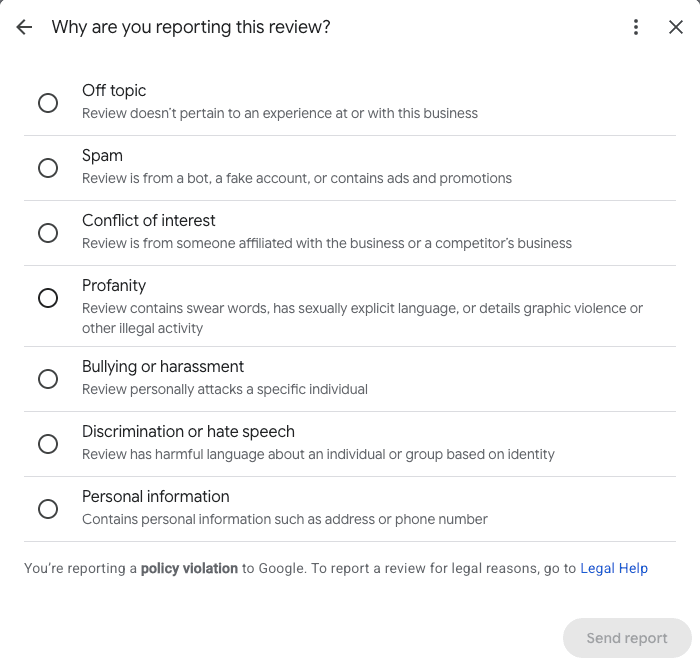
Go to your Business Profile and choose Read reviews. Tap Report next to the review. Pick the reason that fits, and send the report.
Report the reviewer's profile, too.
In the Google Maps app, open your business's reviews and tap the reviewer's name. Tap More, then Report. Google says it will check that profile's activity for policy violations.
Check the status after several days.
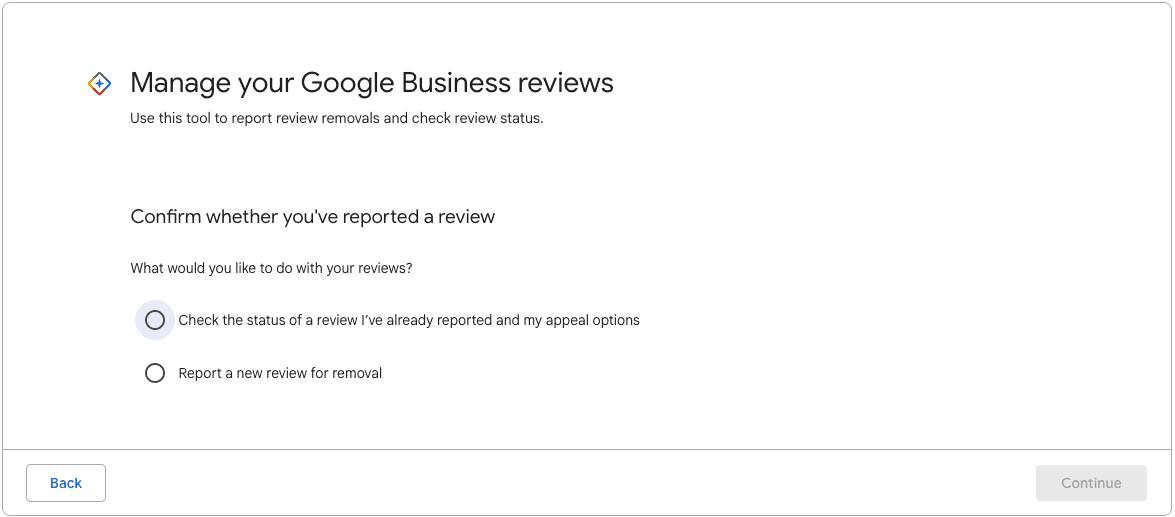
Google says a review check typically takes several days. The status shows in the Reviews Management Tool. It reads Decision pending while Google decides.
Appeal once if it stays up.
If the status reads Report reviewed - no policy violation, you can send a one-time appeal. In the Reviews Management Tool, choose Appeal eligible reviews, pick the review and fill out the form. One appeal can hold up to 10 reviews.
Watch your email.
If the status reads Escalated - check your email for updates, Google sends its updates by email.
A review Google removes for breaking its rules won't be restored (Google's page on missing or delayed reviews, checked on November 17, 2026). If it stays up after your appeal, two things are left: your reply and new reviews.
If you're stuck on why Google won't remove fake reviews, keep its test in mind. Google says reviews are usually removed for policy violations, like spam or inappropriate content (Google's page on missing or delayed reviews). A name missing from your records doesn't show a broken policy on its own.
Either way, reply while you wait.
Reply calmly while Google checks it
Your reply is public, and the reviewer sees it. Google says the person who wrote the review is notified when you reply. They can still change the review after reading it. Once Google approves your reply, it's posted under the review for anyone to read (Google's page on managing reviews, checked on November 17, 2026).
A reply doesn't report the review. The report is its own step, above.
In BrightLocal's 2026 survey of 1,002 US adults, 89% said they expect business owners to respond to reviews. BrightLocal ran it through a SurveyMonkey panel and published it on February 11, 2026 (BrightLocal's Local Consumer Review Survey 2026, read November 17, 2026). It's their finding about reviews in general.
Here's how we'd reply to someone you can't find in your records:
Hi [name], thanks for taking the time to write. We can't find a job under that name. Please reach our office with the job date or the address, so we can look again.
Let real reviews outweigh it
Your review score is the average of all ratings published on Google for your business (Google's page on review scores, checked on November 17, 2026). So each real review makes one bad rating count for less. A new review can take up to 2 weeks to show in your score.
Google also says more reviews and positive ratings can help your local ranking (Google's local ranking tips). See how many 5-star reviews it takes to reach your goal.
Don't try to bury the bad review with fake ones. Google's policy bans reviews that were paid for, directly or in kind (Google's content policy for Maps). Google can stop a profile from getting new reviews or ratings for a set period. It can do that when it finds the owner broke its fake engagement policy (Google's page on Business Profile restrictions).
Getting real reviews is what we do. When a job is marked done in your CRM, we text the customer. The text has a photo of someone on your team holding a whiteboard with the customer's name. It also carries your review link. We ask every customer the same way.
Once your CRM is connected, the texts start. On average, the first new Google reviews come in about 48 hours after that. See how it works.
I built ReviewsOS for my own insulation company first.
These are our own numbers, not figures from an outside study.
About 30% of new customers typically post a review
Over 50% at some companies
35 Google reviews in 14 days: my first run, to past customers of my insulation company
Questions about reviews from people who weren't customers
Can I delete a Google review from someone who wasn't my customer?
No. You can't delete a review someone else wrote, customer or not. You can report it and ask Google to remove it (Google Maps Help).
How long does Google take to remove it?
Google says a review check typically takes several days (Google's page on reporting reviews). Its page gives no time for an appeal, and nothing on it promises removal right away. Watch the status in the Reviews Management Tool.
Should I pay a company to remove the review?
You don't have to. The report and the one-time appeal are steps you take yourself, from your own Business Profile (Google's page on reporting reviews). A company can't delete someone else's review either, so it would have to report it the same way (Google Maps Help). Google still decides, and reviews are usually removed for policy violations (Google's page on missing or delayed reviews). If someone asks you for money to take reviews down, use Google's extortion form and don't pay (Google's page on review extortion scams). What lasts is the step above: let real reviews outweigh it.
Can I send Google my invoices or job records?
Google's page on reporting reviews doesn't describe a way to send them. The report asks you to pick a reason. The appeal has a form, and the page doesn't say what's on it. Use your records to pick the route instead.
How do I contact Google about the review?
Google's page on reporting reviews covers the report, a report on the reviewer's profile and the one-time appeal. If Google's system removes a real review by mistake, the page says to contact support. The contact support link goes to a Google support page, and so does the Contact us link at the end. That support page needs a Google sign-in, so we couldn't see what it offers (Google's page on reporting reviews, checked on November 18, 2026). For review extortion, Google has a separate form (Google's page on review extortion scams). We couldn't confirm a phone line or a chat for reviews on a Google page, so we don't list one.
Sources
- Add, edit, or delete Google Maps reviews & ratings, Google Maps Help, read November 17, 2026
- Prohibited & restricted content (Maps User Generated Content Policy), Google, read November 17, 2026
- Fake engagement, Maps User Generated Content Policy, Google, read November 17, 2026
- Report inappropriate reviews on your Business Profile, Google Business Profile Help, read November 17, 2026
- Report negative review extortion scams on your Business Profile, Google Business Profile Help, read November 17, 2026
- About missing or delayed reviews, Google Business Profile Help, read November 17, 2026
- Manage customer reviews, Google Business Profile Help, read November 17, 2026
- Local Consumer Review Survey 2026, BrightLocal, published February 11, 2026, read November 17, 2026
- Understand review scores for local places & businesses, Google Business Profile Help, read November 17, 2026
- Tips to improve your local ranking on Google, Google Business Profile Help, read November 17, 2026
- Business Profile restrictions for policy violations, Google Business Profile Help, read November 17, 2026
We’ll get you 10 Google reviews for free to prove it works.
We start with the customers you've already served.
No card needed, First reviews in 48hr, 15-min setup call
Or see it first: get the text your customers will get.