Competitor reviews
How to remove a Google review left by a competitor
Google bans reviews posted to hurt a competitor. Report the review, then appeal if it stays up.
No card needed, First reviews in 48hr, 15-min setup call

Google lists industry competitors as one example of a conflict of interest in its review rules (Google's review policy). So a review a rival posted to hurt you breaks Google's rules. Report it from your Business Profile or in Google's Reviews Management Tool. Google says review evaluation typically takes several days. If Google checks it and the review stays up, you can appeal it once (Google's help page on reporting reviews, checked on November 17, 2026). Google makes the call, not you. And can Google reviews be deleted? Yes, when Google finds a review breaks its rules, not because you disagree with it.
Signs a review came from a competitor
Google's pages list rules, not signs. The signs below are our reading of what an owner sees, and each row names the rule it fits. Google's review policy lists what merchants and users may not do. One item reads: "Post content on a competitor's place or business to undermine that business' or product's reputation." The same policy lists industry competitors as an example of a conflict of interest, under its rating manipulation rules.
| What you see | The Google rule it fits | What you do |
|---|---|---|
| The reviewer's name matches a rival owner or a rival company | Posting on a competitor's business to hurt it isn't allowed. Industry competitors count as a conflict of interest. | Write it down, then report it. |
| The review points readers to another company in your trade | Content based on a conflict of interest, such as industry competitors | Write it down, then report it. |
| You have no record of a job with this person | A review should reflect a real experience with the business | Check your job records, then report it. More on a review from someone who was never your customer. |
| Several 1-star and 2-star reviews land at once | No coordinated campaigns to push a rating unfairly up or down | Report each one. Then read the part on a wave of 1-star reviews below. |
| Someone asks for money to remove bad reviews | Google calls this negative review extortion | Don't pay. Report it to Google. |
The rules in the table come from Google's review policy, genuine experience page, rating manipulation page and page on review extortion scams, checked on November 17, 2026.
What to write down before you report
First, make sure it isn't a customer you forgot. Google says: "Do not report a review just because you disagree with it or dislike it" (Google's help page on reporting reviews). A harsh review from a real customer isn't a competitor review.
The same page doesn't say what proof Google accepts for a competitor review. Its appeal steps say only to fill out the form. So go in with notes, not a hunch.
A name that matches someone at a rival company doesn't prove who wrote the review. Two people can share a name. Write down what you see, not who you think it is.
For each review, we suggest you note:
- A direct link to the review. Have it ready for the appeal form. Google asks for direct links when you report an extortion attempt.
- The reviewer's name as it shows, and the date of the review.
- Any words that point to a rival, such as another company's name.
- Whether the name matches any job in your software.
- Which Google rule it breaks, in Google's words, so it's ready for the appeal.
- A screenshot of the review.
How to report a competitor's review and appeal once
These steps follow Google's help page on reporting reviews, checked on November 17, 2026, in the order you'd do them.
Open your reviews.
Go to your Business Profile and choose Read reviews.
Report the review and pick the closest reason.
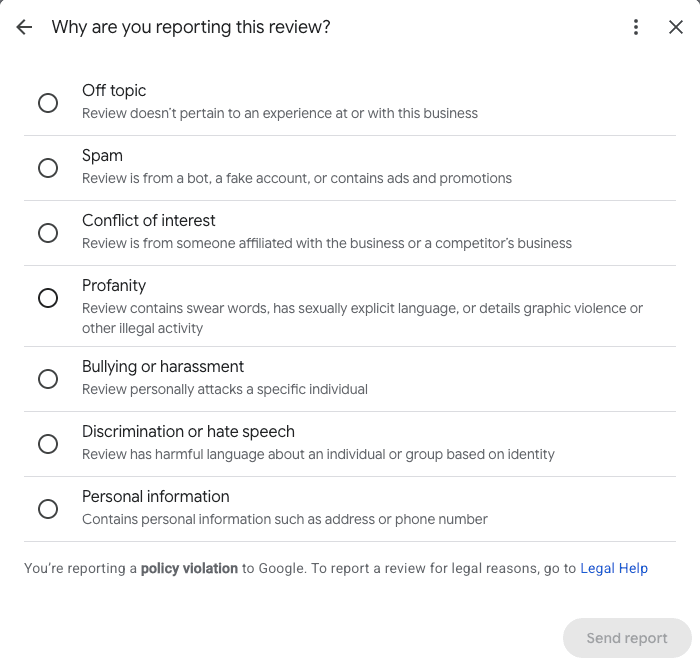
Google asks you to select a reason to flag the review. Its help page doesn't list every reason. In our own Business Profile on November 17, 2026, the screen "Why are you reporting this review?" listed seven reasons. One is Conflict of interest: "Review is from someone affiliated with the business or a competitor's business." Our tip: pick that one for a review you believe a rival wrote. If your screen doesn't show it, pick the reason that fits closest. You can also start in the Reviews Management Tool.
Report the reviewer's profile, too.
In the Google Maps app, find your business and open its reviews. Tap the reviewer's name, then More, then Report.
Check the status.
Google says review evaluation typically takes several days. The Reviews Management Tool shows one of three statuses. They are Decision pending, Report reviewed - no policy violation, and Escalated - check your email for updates.
Appeal if it stays up.
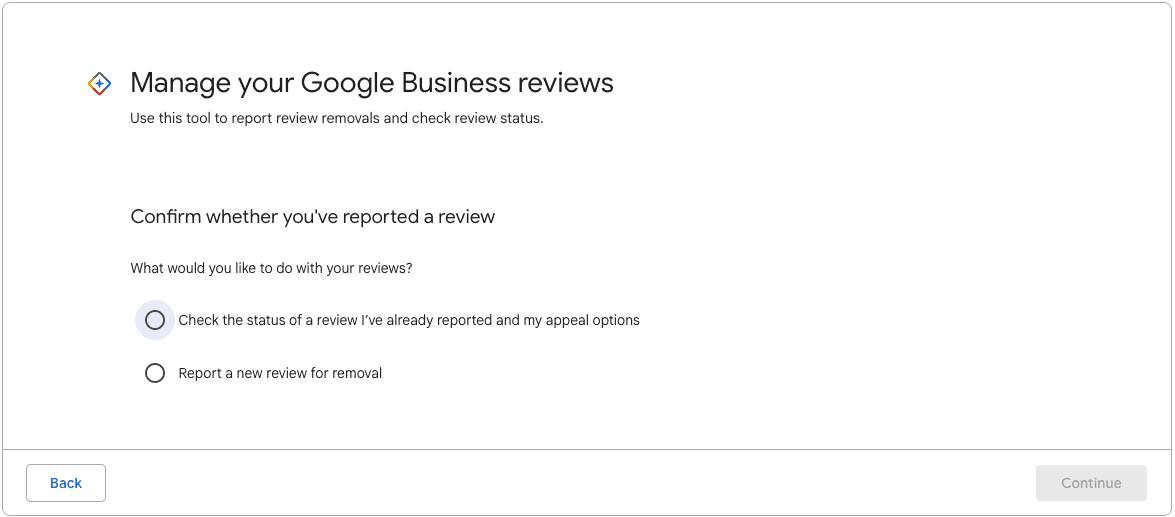
If a flagged review doesn't qualify for removal, Google allows a one-time appeal. In the tool, pick your business, then choose Check the status of a review I reported previously and appeal options. Choose Appeal eligible reviews, pick the reviews and choose Submit an appeal. Then fill out the form in the new tab. Each review can be appealed once, and one appeal can hold up to 10 reviews. If Google finds a review follows its policies, it stays up. Our tips: put the competitor reviews together in one appeal. If the form has room, name the rule each one breaks.
If the appeal fails too, Google's help page gives no further step.
Keep getting real reviews while Google checks and after it decides. Each new rating shrinks the weight of a rival's 1-star in your average. Real reviews are also your answer when Google refuses to take a review down. See how many 5-star reviews it takes to reach your goal.
A wave of 1-star reviews at once
A run of 1-star and 2-star reviews in a short time can be a coordinated attack. Google's rules don't allow coordinated campaigns that push a place's rating unfairly up or down (Google's page on rating manipulation, checked on November 17, 2026).
Report each review. That's how to remove a fake review too: report it, check the status and appeal if it stays up. You can put several in one appeal, as in the steps above.
On April 16, 2026, Google wrote what it would do after a sudden spike in spam reviews. It said it would quickly remove the fake content and pause new reviews on the profile. It would also alert the owner and show a notification banner (Google's post on protecting businesses on Maps). We can't confirm it works that way on your profile today.
If someone asks for money to remove the reviews, it's a scam. Google calls it negative review extortion. It says these scams can start with a sudden rise in 1-star and 2-star reviews. Don't pay. Google asks you to report it promptly and share direct links to every review in the attempt. Start on Google's page on review extortion scams, checked on November 17, 2026.
Don't hit back with reviews of your own
Google's ban on posting to hurt a competitor covers merchants as well as users, so it binds you too. Google can act on the accounts that do it. Its steps range from suspending account privileges to closing the account (Google's review policy). Google also counts a review biased by a professional conflict of interest as incentivized or biased (Google's page on incentivized or biased reviews, checked on November 17, 2026).
If your own profile gets reviews that break these rules, Google can restrict it. It can block new reviews, unpublish existing ones or show a warning (Google's page on Business Profile restrictions).
So keep clear of these:
- Don't post a review on a rival's profile, from any account.
- Don't ask friends or family to review either business. Google lists family ties as a conflict of interest.
- Don't pay or give anything for 5-star reviews to bury the bad one. Google counts those as incentivized reviews.
- Ask for real reviews instead, from every customer, the same way. Here's what to say when you ask.
Reply in public without naming the competitor
Google checks your reply against its content policies (Google's page on managing reviews, checked on November 17, 2026). Google's reply tips say to be professional and polite, and to keep replies short and simple (Google's page of tips to get more reviews, checked on November 18, 2026).
Our advice: stay calm and keep it short. Don't name the rival or accuse anyone. Anyone who opens your profile can read your reply, and a guess can be wrong. Say only what's true. For example, if you can't find the job in your records, say so. Then invite the reviewer to get in touch so you can sort it out.
A reply doesn't report the review, so report it as its own step. Google's page notes the reviewer can still change the review after reading your reply. Then get back to getting new reviews: make your free Google review link.
Real reviews make one bad rating count for less
Your review score is the average of all ratings published on Google for your business (Google's page on review scores, checked on November 17, 2026). So the more real ratings you have, the less one rival's rating moves it. A new score can take up to 2 weeks to show.
Google also says more reviews and positive ratings can help your local ranking (Google's local ranking tips).
Getting those real reviews is what we do. When a job is marked done in your CRM, we text the customer a photo and your review link. The photo shows someone on your team holding a whiteboard with the customer's name on it. It gets their attention, then the text asks for the review. We ask every customer the same way. See how the photo text works.
I built ReviewsOS for my own insulation company first.
These are our own numbers, not figures from an outside study.
About 30% of new customers typically post a review
Over 50% at some companies
35 Google reviews in 14 days: my first run, to past customers of my insulation company
Questions about competitor reviews
How do I get an unfair Google review removed?
Report it, and Google decides. Google says reviews are usually removed for policy violations (Google's page on missing or delayed reviews, checked on November 17, 2026). It also says it doesn't get involved in conflict between businesses and customers (Google's help page on reporting reviews). So unfair isn't enough on its own. If a rival wrote it, report it and appeal if it stays up. If a real customer wrote it and it breaks no rule, it stays up. New real reviews are then your answer.
Can I delete a Google review someone else left on my profile?
Google's page on managing reviews describes no delete button for owners. It says you can flag a review you believe breaks Google's content policies (Google's page on managing reviews). Then Google decides.
How fast does Google remove a competitor's review?
Google says review evaluation typically takes several days (Google's help page on reporting reviews). Its page gives no time for an appeal. Watch the status in the Reviews Management Tool.
Can a removal service get a competitor's review down faster?
Google's help page on reporting reviews names no faster route and no paid service. Its steps are to report the review, report the reviewer's profile in the Google Maps app, and appeal once if the review stays up. Google makes the call either way. Our reading: a service that reports the review for you goes through the same report and the same wait. The lasting answer is more real reviews.
Sources
- Prohibited & restricted content (Maps User Generated Content Policy), Google, read November 17, 2026
- Rating Manipulation, Maps User Generated Content Policy, Google, read November 17, 2026
- Incentivized or Biased Reviews, Maps User Generated Content Policy, Google, read November 17, 2026
- Genuine experience, Maps User Generated Content Policy, Google, read November 17, 2026
- Report inappropriate reviews on your Business Profile, Google Business Profile Help, read November 17, 2026
- Reviews Management Tool, Google Business Profile Help, read November 17, 2026
- Missing or delayed reviews, Google Business Profile Help, read November 17, 2026
- Report negative review extortion scams, Google Business Profile Help, read November 17, 2026
- New ways we're protecting businesses on Maps, Google, April 16, 2026, read November 17, 2026
- Business Profile restrictions for policy violations, Google Business Profile Help, read November 17, 2026
- Manage customer reviews, Google Business Profile Help, read November 17, 2026
- Tips to get more reviews, Google Business Profile Help, read November 18, 2026
- Understand review scores for local places & businesses, Google Business Profile Help, read November 17, 2026
- Tips to improve your local ranking on Google, Google Business Profile Help, read November 17, 2026
We’ll get you 10 Google reviews for free to prove it works.
We start with the customers you've already served.
No card needed, First reviews in 48hr, 15-min setup call
Or see it first: get the text your customers will get.