Fake Google reviews
How to remove fake and spam Google reviews
Report the review from your Business Profile. If Google says no, you get one appeal.
No card needed, First reviews in 48hr, 15-min setup call

Google removes a fake or spam review once it checks your report and finds the review breaks its rules. You report it from your Business Profile, then check the status in Google's Reviews Management Tool. If the review stays up, you can appeal one time (Google's help page on reporting reviews, checked on November 17, 2026). If someone demands money to take bad reviews down, don't pay (Google's page on review extortion scams). For other kinds of reviews, see the full guide to removing Google reviews.
What Google counts as a fake or spam review
Google's policy calls this fake engagement. Its glossary sums it up in one line: "Fake engagement is content that does not represent a genuine experience." (Google's fake engagement page, checked on November 17, 2026). Google's review policy lists what breaks it:
- A review that isn't based on a real experience with your business.
- A review that was paid for, with money or in kind.
- Reviews posted from several accounts by one person, or at one person's request.
- The same review posted again and again, from one account or many.
- A review a competitor posts to hurt your reputation.
- A review from someone with a conflict of interest, such as a current or former employee.
- Any attempt to push a star rating up or down, including a coordinated campaign. Google calls this rating manipulation.
Check the name against your job records first
Before you report, look up the reviewer's name in your job software. That's our advice, not a Google step. It tells you which route the review needs.
If the name matches a job, it's likely a real customer's review, even if it's harsh. A real experience isn't fake engagement, so the fake route won't fit. Our guide on bad reviews from real customers covers that case.
A name that's missing from your records doesn't prove the review is fake. People sometimes post under a nickname or someone else's account.
You may think the reviewer was never a customer, or works for a competitor. Competitor reviews are on Google's list above. You report reviews from people who were never customers the same way, with the reason that fits.
Google also asks owners not to report a review just because they disagree with it or dislike it (Google's help page on reporting reviews).
How to report a fake Google review and appeal once
These steps follow Google's help page on reporting reviews, checked on November 17, 2026. They're in the order you'd do them.
Open your reviews.
Go to your Business Profile and choose Read reviews.
Report the review.
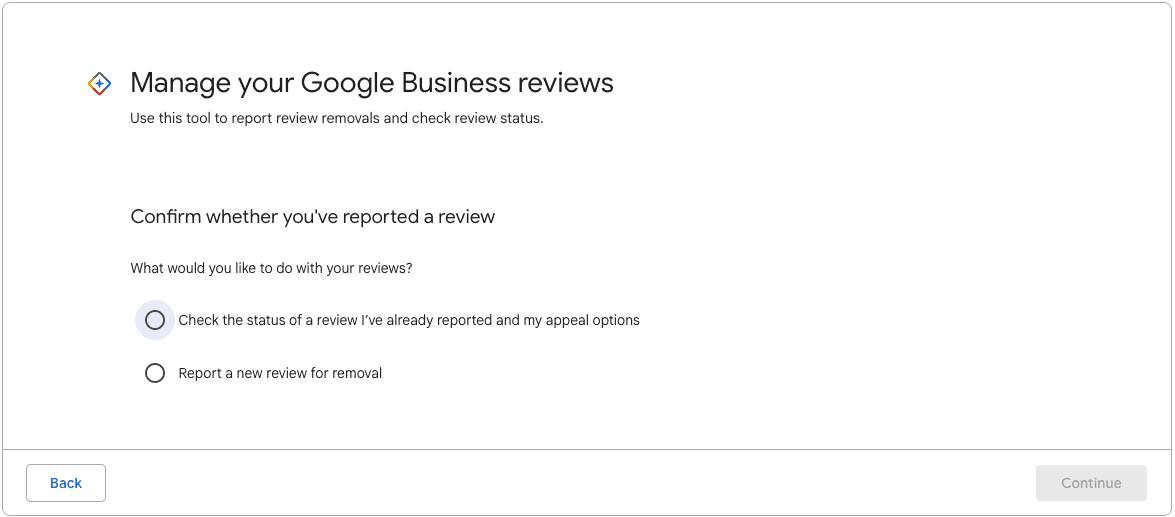
Tap Report next to the review. Pick the reason that fits, such as Spam, and send the report. You can also start in the Reviews Management Tool. Choose Report a new review for removal, pick the review and a reason, then select Submit.
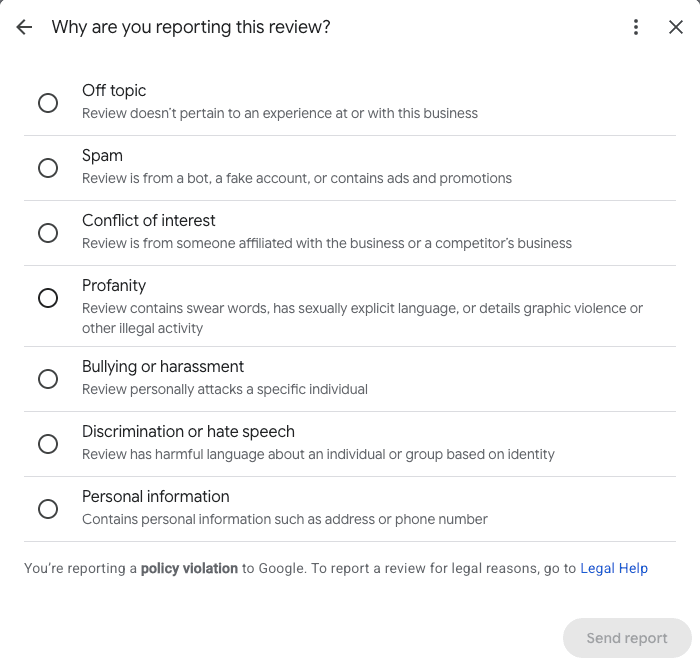
You can report the reviewer's profile, too.
In the Google Maps app, tap the reviewer's name. Then tap More, then Report.
Check the status.
Google says a review check typically takes several days. The status shows in the Reviews Management Tool.
Appeal once if it stays up.
If Google finds no rule broken, you can send a one-time appeal. In the tool, check the status, choose Appeal eligible reviews, then Submit an appeal. One appeal can hold up to 10 reviews, and Google sends the answer by email. Our tip: if Google kept several fake reviews, appeal them together.
A review Google removes for breaking its rules no longer shows on Maps and Search (Google's help page on reporting reviews). It won't be restored (Google's page on missing or delayed reviews). The tool shows one of these statuses.
| Status | What it means | What you do |
|---|---|---|
| Decision pending | Google hasn't decided yet. | Wait. A check typically takes several days. |
| Report reviewed - no policy violation | Google found no rule broken, so the review stays up. | Send your one-time appeal. |
| Escalated - check your email for updates | Google sends updates about your report by email. | Watch your inbox. |
If Google keeps the review up, our guide explains why Google says no. While Google checks, get more real reviews. Then one fake moves your average less. Work out how many 5-star reviews you need.
A wave of 1-star reviews with a demand for money
A sudden run of 1-star and 2-star reviews, then a demand for money to remove them, is a scam. The demand can also be for goods or services. Google calls it negative review extortion. Its advice is plain: "Do not engage with or pay the malicious individuals." (Google's page on review extortion scams, checked on November 17, 2026).
Then follow Google's steps:
- Don't try to settle it yourself by offering money or services.
- Gather all the evidence right away.
- Take clear screenshots of every message they sent you.
- Send it all through the merchant extortion report form on Google's page on review extortion scams.
What Google does on its own about fake reviews
Google's own systems look for fake reviews too. Google posted its 2025 figure on April 16, 2026. Its systems and analysts blocked or removed over 292 million reviews that broke its rules (Google's post on protecting businesses on Maps). The post doesn't say how many were stopped before anyone saw them.
The same post described new protections for a sudden spike of spam reviews. Google said it would quickly remove the fake ones and pause new reviews on the profile. It would also alert the owner and show a notice banner. Google said these protections would roll out worldwide in the coming weeks. The post doesn't say when they reach the US.
Google also said its systems now spot certain scam patterns better. Its example was a demand for payment to remove fake 1-star reviews. Google says this lets it stop suspicious posts before they go live.
Customers may see a sign of this work. When Google detects suspicious review activity on a business, it may show a banner on that page. The banner says suspicious reviews were removed (Google's page on consumer alerts, checked on November 17, 2026).
Faking your own reviews to bury one backfires
Posting or buying 5-star reviews to push a fake one down breaks the same rules. Paid reviews are fake engagement. So are reviews posted from several accounts by one person. If Google finds a business owner broke that policy, its page lists what it can do (Google's page on Business Profile restrictions, checked on November 17, 2026). The page doesn't say how long a set period lasts.
- The profile can't get new reviews or ratings for a set period.
- Its existing reviews and ratings are unpublished for a set period.
- It shows people a warning that fake reviews were removed.
What real reviews do for your score
Real reviews make a fake one count for less. Your review score is the average of all ratings published on Google for your business (Google's page on review scores, checked on November 17, 2026). So the more real ratings you have, the less one fake rating moves the average. A new score can take up to 2 weeks to show.
Google also says more reviews and positive ratings can help your local ranking (Google's local ranking tips). See how many 5-star reviews it takes to reach your goal.
Getting those real reviews is what we do. When a job is marked done in your CRM, we text the customer a photo and your review link. The photo shows someone on your team holding a whiteboard with the customer's name on it. It gets their attention, then the text asks for the review. We ask every customer the same way. See how it works.
I built ReviewsOS for my own insulation company first.
These are our own numbers, not figures from an outside study.
About 30% of new customers typically post a review
Over 50% at some companies
35 Google reviews in 14 days: my first run, to past customers of my insulation company
Questions about fake Google reviews
How long does Google take to remove a fake review?
Google says a review check typically takes several days (Google's help page on reporting reviews). Its page gives no time for an appeal. Watch the status in the Reviews Management Tool.
Can I contact Google support about a fake review?
Google's help page on reporting reviews names support for one case: a real review Google's system took down by mistake. For a fake review, the page gives the route above: report it, then appeal once. A demand for money has its own report form, on Google's page on review extortion scams.
How do I remove spam reviews on my Google Business Profile?
Report each one the same way as a fake review, and pick Spam as the reason. If a wave of them comes with a demand for money, follow Google's extortion steps above. Don't pay.
Should I reply to a fake review?
That's your call. Google lets you reply once your business is verified, and your reply shows publicly under the review (Google's page on managing reviews). A reply doesn't report the review, so report it as a separate step. If you reply, keep it short and calm. That's our advice, not a Google rule. If your job records show no match, say you have no record of this job. Ask the reviewer to contact your office. Don't share any customer's details. Then put your effort into getting real reviews.
Will Google remove a review just because it's unfair?
No. Google says it removes reviews that break its rules, not reviews that are unfair. It doesn't get involved in conflict between businesses and customers. If a review follows its policies, it stays up (Google's help page on reporting reviews).
Sources
- Report inappropriate reviews on your Business Profile, Google Business Profile Help, read November 17 and 18, 2026
- Report negative review extortion scams, Google Business Profile Help, read November 17, 2026
- Fake engagement, Maps User Generated Content Policy, Google, read November 17, 2026
- Prohibited & restricted content (Maps User Generated Content Policy), Google, read November 17, 2026
- Rating Manipulation, Maps User Generated Content Policy, Google, read November 17, 2026
- About missing or delayed reviews, Google Business Profile Help, read November 17, 2026
- New ways we're protecting businesses on Maps, Google, April 16, 2026, read November 17, 2026
- Consumer alerts, Maps User Generated Content Policy, Google, read November 17, 2026
- Business Profile restrictions for policy violations, Google Business Profile Help, read November 17, 2026
- Understand review scores for local places & businesses, Google Business Profile Help, read November 17, 2026
- Tips to improve your local ranking on Google, Google Business Profile Help, read November 17, 2026
- Manage customer reviews, Google Business Profile Help, read November 17, 2026
- Reviews Management Tool, Google Business Profile Help, read November 17, 2026
We’ll get you 10 Google reviews for free to prove it works.
We start with the customers you've already served.
No card needed, First reviews in 48hr, 15-min setup call
Or see it first: get the text your customers will get.