Guide
How to get Google reviews for a new business, starting from zero
Set up your free profile once. Then ask the customers you've already served, and every new one.
No card needed, First reviews in 48hr, 15-min setup call

To get Google reviews for a new business, set up your free Google Business Profile and verify it. Then make your free Google review link. Ask the customers you've already served first, a few at a time. After that, ask every new customer once the job is done. Your first reviews have to come from real customers. Google's policy rules out reviews from family and from people who work for you (Google's review policy).

Step 1: Set up and verify your free Google Business Profile
Your profile comes first, and it costs nothing. Google's product page puts it plainly: "Yes, creating a Business Profile and listing your business on Google is free." (Google Business Profile). Verifying is what makes the profile yours. These steps follow Google's page on verifying your business, checked on November 17, 2026.
Create the profile.
Go to Google Business Profile and list your business.
Set your address or service area.
Google's guidelines say: "Use a precise, accurate address and/or service area to describe your business location." (Google's guidelines for representing your business).
Pick how to verify.
The ways Google lists are phone or text, email, a live video call and mail.
Wait for Google.
Google says verification reviews take up to 5 business days, and longer on rare occasions. If you verify by mail, most codes arrive within 14 days. Codes expire after 30 days.
Google says verifying tells it you're authorized to represent the business. That makes your business "more likely to show up in search results" (Google's local ranking tips). This setup is the first step of getting Google reviews for your business, new or not.
If you haven't opened yet, look at your opening date. Google lets you enter a date up to one year ahead. If your date is in the future, nobody can post a review on your profile until you're officially open (Google's page on opening dates, checked on November 17, 2026). Once you open, your profile shows a "Recently opened" tag for 90 days.
So plan your first asks for the week you open, not before. Then go to Step 2.
Step 2: Make your Google review link
Your review link opens the spot where a customer writes you a review. Google says a link or QR code makes it easier for customers to leave reviews on your profile. These steps follow Google's page on review links, checked on November 17, 2026.
Open your profile.
Go to your Business Profile.
Find the link.
Select Read Reviews, then Get more reviews.
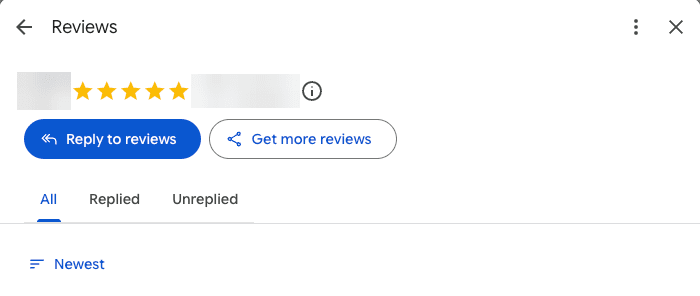
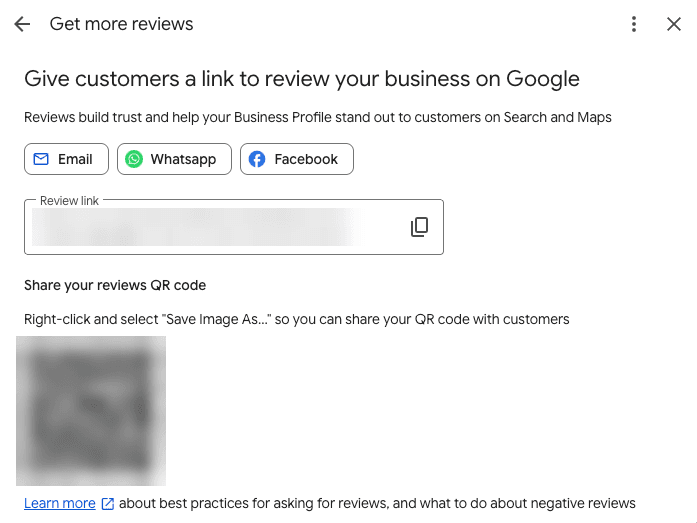
Copy it.
Select Copy. For now, Google's review QR code can only be made on a computer browser, not on a phone. You can also make a review QR code you can print.
Step 3: Ask the customers you've already served
Start with the jobs you've already done. Those customers can review you now, because their jobs are finished.
Google's rule is that reviews "must reflect a genuine experience" (Google's tips to get more reviews). A customer whose job you did last month had one.
We ask every customer the same way. So ask them all.
Spread those asks over several days. In a 2024 post, Google wrote that its systems examine signals like "a sudden spike in 1 or 5-star reviews" (Google's Keyword blog, February 13, 2024). Google doesn't say what happens after that. Our advice: don't text the whole list in one day. We text past customers a few at a time.
I built ReviewsOS for my own insulation company first. My first run there went to past customers. It brought 35 Google reviews in 14 days.
Brand new, with no past jobs yet? Skip to Step 4 and start on your first job.
Step 4: Ask every new customer once the job is done
Send a review request text once the job is marked done in your job software. Google's pages name other ways to share the same link: a QR code to scan (Google's tips to get more reviews), and email, WhatsApp or a Facebook post (Google's page on review links).
For the words to use, see what to say when you ask.
One text is easy to miss on a busy day. We recommend one request right after service and up to two gentle reminders. With ReviewsOS, the follow-ups stop once the customer reviews.
The Google pages we read set no time to ask and no rule on reminders. Those two parts are our practice. In our view, the same ask on every job is the best way to get Google reviews over time.
Google's rules for your first reviews
It's tempting to ask family or people you know for the first few reviews. Google's policy says no. It bans reviews based on a "conflict of interest," including "current or former employment" and "familial relationships" (Google's review policy, checked on November 17, 2026). Here's what Google's policy and tips page rule out:
- Reviews from your family, or from people who work for you now or used to.
- Reviews from anyone with what Google calls "other professional or personal affiliations" to you.
- Reviews posted from several accounts by one person, or at one person's request.
- A gift, discount or free service in exchange for a review. Google calls that "strictly prohibited" (Google's tips to get more reviews).
- Requiring or pressuring customers "to leave ratings or write reviews while on the premises." Asking for certain words in the review is out too.
- Asking only the customers you think are happy. Google's policy bars businesses that "selectively solicit positive reviews from customers."
Google says it takes fake reviews, and reviews given in return for something, very seriously. Its page on profile restrictions lists what it can do. A profile can be blocked from getting new reviews for a set period. Its existing reviews can be unpublished for a set period. And the profile can show a warning that fake reviews were removed (Google's page on Business Profile restrictions).
So your first reviews should come from real customers. Start with the customer list in your job software.
How many reviews a new business needs
The Google pages we read set no number. Your review score is "the average of all ratings published on Google" for your business (Google's page on review scores). That page gives no minimum number of reviews.
More reviews still help. Google says: "More reviews and positive ratings can help your business's local ranking." (Google's local ranking tips).
Customers count reviews too. BrightLocal's Local Consumer Review Survey 2026 asked a SurveyMonkey panel of 1,002 US adults. It was published February 11, 2026. It found that "47% of consumers won't use a business with fewer than 20 reviews." It also found that "only 9% are willing to use one with five or fewer." (BrightLocal's survey, read November 17, 2026).
Our reading of it: 20 reviews is a fair first goal. To see how many 5-star reviews it takes to reach the rating you want, use the Google review calculator. After your first 20, the goal is more Google reviews, job after job.
Here's how many reviews businesses in a few trades had in Google's top 3 map results, in one large study. In the low-end column, about 9 in 10 of those businesses had at least that many reviews.
| Trade | Low end | Typical (median) |
|---|---|---|
| Plumber | 21 | 215 |
| HVAC contractor | 25 | 244 |
| Electrician | 4 | 56 |
| Roofing contractor | 13 | 79 |
| General contractor | 3 | 28 |
From Local Falcon's whitepaper, published January 14, 2026 and read November 17, 2026. It studied about 50.4 million US Local 3-Pack results from October to December 2025. Local Falcon says this shows what top-3 businesses have, not what put them there. The data also reflects where its users scan.
How fast the first reviews come in
Your fastest first reviews come from past customers, because their jobs are already done. That's Step 3.
Google's verification review in Step 1 can take up to 5 business days. Verifying makes the profile yours, and you must verify before you can reply to reviews. The reviews themselves come as you ask. Google's times below come from its pages on verifying, missing or delayed reviews and review scores. The 48-hour figure is our own average, not an outside study.
- Verify. Google's verification review takes up to 5 business days.
- Texts start. With ReviewsOS, the texts go out once your CRM is connected.
- First reviews. On average, the first new Google reviews come in about 48 hours after that.
- Some reviews wait. Google checks reviews against its policies, and in some cases that can delay a review a few days.
- Score update. Google says your review score can take up to 2 weeks to update after a new review.
Asking every customer without having to remember
When a job is marked done in your CRM, ReviewsOS texts that customer. The text has a photo of someone on your team holding a whiteboard with the customer's name. It also has the link to your Google review page. The photo gets the customer's attention first. Then the text asks for the review.
The text usually goes out within an hour of the job closing, and only during set hours. Your past customers get it too, a few at a time.
Setup is one 15-minute call. ReviewsOS works with all the major CRMs, such as Jobber, Housecall Pro, ServiceTitan, QuickBooks and more. Anything else that can send a webhook or connect through an API works too. See how it works, or see which CRMs connect.
These are our own numbers, not figures from an outside study.
About 30% of new customers typically post a review
Over 50% at some companies
15 min one setup call
Questions new business owners ask
How much does it cost to get Google reviews?
Nothing on Google's side. Google says creating a Business Profile is free (Google Business Profile). The reviews themselves can't be bought. Google's policy bans "Reviews or ratings that have been paid for, directly or in kind." (Google's review policy). With ReviewsOS, $150 a month covers up to 100 review requests. If you send more than that, talk to us. A reminder doesn't count as one of the 100. Your first 10 Google reviews are free, and we don't ask for a card. There's no annual contract, and you can cancel anytime. See pricing.
Does my customer need a Gmail account to leave a review?
No. They need to be signed in to a Google Account. They can set one up with an email address that isn't Gmail (Google's tips to get more reviews).
Can I reply to my first reviews?
Yes, once your business is verified. Google says you must verify before you can reply to reviews. Google checks each reply too. That usually takes up to 10 minutes, but sometimes up to 30 days (Google's page on managing reviews).
Sources
- Get Listed on Google: Google Business Profile, Google, checked on November 17, 2026
- Verify your business on Google, Google Business Profile Help, checked on November 17, 2026
- Guidelines for representing your business on Google, Google Business Profile Help, checked on November 17, 2026
- Tips to improve your local ranking on Google, Google Business Profile Help, checked on November 17, 2026
- Add a business opening date, Google Business Profile Help, checked on November 17, 2026
- Create a Google link or QR code to request reviews, Google Business Profile Help, checked on November 17, 2026
- Tips to get more reviews, Google Business Profile Help, checked on November 17, 2026
- How machine learning keeps contributed content helpful, Google, The Keyword, Dan Pritchett, February 13, 2024, checked on November 17, 2026
- Prohibited & restricted content (Maps user contributed content policy), Google, checked on November 17, 2026
- Business Profile restrictions for policy violations, Google Business Profile Help, checked on November 17, 2026
- Understand review scores for local places & businesses, Google Business Profile Help, checked on November 17, 2026
- Local Consumer Review Survey 2026, BrightLocal, published February 11, 2026, a SurveyMonkey panel of 1,002 US adults, read November 17, 2026
- Whitepaper: What 50 Million Search Results Reveal About Ranking in the Local 3-Pack, Local Falcon, published January 14, 2026, US Local 3-Pack results from October to December 2025, read November 17, 2026
- About missing or delayed reviews, Google Business Profile Help, checked on November 17, 2026
- Manage customer reviews, Google Business Profile Help, checked on November 17, 2026
We’ll get you 10 Google reviews for free to prove it works.
We start with the customers you've already served.
No card needed, First reviews in 48hr, 15-min setup call
Or see it first: get the text your customers will get.