Google review links
How to get a Google review short link that fits in a text
Get your link from Google, tap it on your phone, and text it as it is.
No card needed, First reviews in 48hr, 15-min setup call

You don't need a link shortener for your Google review link. Copy the link Google gives you. In your Business Profile, select Read Reviews, then Get more reviews, then Copy (Google's help page on review links, checked on November 17, 2026). Can't sign in to your Business Profile? Our free link maker makes the link from your business name. If software sends your texts, skip public shorteners like bit.ly. Twilio, a company that sends business texts, says they're not permitted in registered business texting over regular 10-digit numbers (Twilio's error 30963 page). Google doesn't let you make a custom short name anymore (Google's short name page). A full review link made from a Place ID also fits in one text. With Google's sample ID, it's 79 characters, and one text of plain letters and numbers holds 160.
How to get your review link and text it
Step 1 follows Google's help page. Steps 2 to 4 are how we'd do the rest.
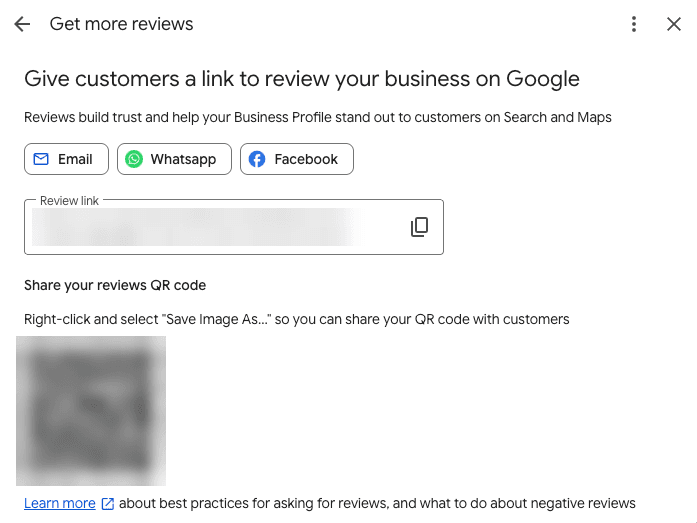
Copy Google's link.
Open your Business Profile and select Read Reviews. Select Get more reviews, then select Copy. Google's page also says its review QR code can only be made in a computer browser, not on a phone (Google's help page on review links).
No Business Profile login? Make the link from your business name.
Make your review link with our free link maker. It gives you a link in this form: https://search.google.com/local/writereview?placeid= plus your Place ID. A Place ID is the code Google gives a place on its map. If you paste a g.page/r/ link, our tool takes it as a ready-made review link. It can't read a maps.app.goo.gl, goo.gl or g.co share link. Open that link in a computer browser, then copy the long link from the address bar and paste that.
Tap it on your own phone before you send it.
We'd do this every time you get a new link. Check that it opens a place to write a review for your business. If it opens a different business or an error, make the link again.
Put it in the text.
One text holds 160 characters. A longer text splits into parts of 153 characters each (Twilio's page on message length). That's for plain letters and numbers. Keep the words short, and a thank-you plus the link fits in one text. For the words themselves, see what to say when you ask. Our guide shows other ways to send your review link to customers.
How much of one text a review link takes
Here's the count with Google's sample Place ID and a short thank-you.
| What | Characters |
|---|---|
| A full review link with Google's sample Place ID | 79 |
| A short thank-you: Thanks for having us out today. Could you leave us a Google review? | 67 |
| The thank-you, one space and the link | 147 |
| One text of plain letters and numbers | 160 |
| Each part of a longer text | 153 |
Google says a Place ID has no set length, so your own link can be longer (Google's Place ID page). The counts are ours, from Google's sample ID and Twilio's page on message length.
Skip bit.ly when software sends your texts
If an app or software sends your review texts, don't run the link through bit.ly. The same goes for any other public shortener. This part covers texts sent by business software, not a text you type on your own phone.
Typing the text on your own phone? The full link still fits. With Google's sample Place ID, a short thank-you and the link come to 147 characters, and one text holds 160.
Twilio's rule covers A2P 10DLC. That's business texting from software over a regular 10-digit number, registered for business use. Twilio says public shorteners are not permitted there "because they mask the true destination URL." In plain words, the customer can't see where the link goes. A short domain owned and run by the business that sends the texts, like Twilio's example yourcompany.link, is generally OK (Twilio's error 30963 page, dated October 27, 2026).
CTIA, the group for the US wireless industry, says much the same in its texting guide. A shortener, if used, should be on a web address used only by the company that sends the texts (CTIA Messaging Principles and Best Practices, section 5.3.2, May 2023).
A short link also works only as long as the company behind it keeps it running. Google's own goo.gl links show how that goes. Google stopped making new ones in 2018. In 2024, it said goo.gl links would stop working after August 25, 2025. Then it changed course and kept the links people still use (Google Developers Blog). Either way, the call was Google's to make.
Rather not handle any of this? We can send the texts for you. Here's how our texts work.
What Google still lets you make
Here's where Google's own links stand today (Google's short name page, checked on November 17, 2026). For links that open in Google Maps, see our Maps review link guide.
| Link | Can you make a new one? | Does an old one still work? |
|---|---|---|
| The review link from Get more reviews | Yes. Copy it from your Business Profile. | Google's page doesn't say. |
| A Business Profile short name (g.page) | No. "You can no longer create or edit short names." | Yes, but Google no longer shows it on your profile. |
| A goo.gl link | No, not since 2018. | Yes. Links made by Google apps, like Maps sharing, keep working. Google also kept its other links that people still use. |
Don't delete an old short name: once it's deleted, you can't create it again. The goo.gl row comes from the Google Developers Blog. Need a new link? Copy it under Get more reviews, or make your review link from your business name.
Check a link with a Place ID once a year
This only matters if your link has placeid= in it, like the one from our link maker.
Google says Place IDs may change over time. It recommends refreshing any Place ID that's more than 12 months old (Google's Place ID page). So once a year, make your link again and tap it on your phone. If the new link is different, send the new one.
If you need a Google review link for multiple locations, make one link for each location and check each one.
How our text carries your link
When a job is marked done in your CRM, we text that customer for you. The text has a photo of someone on your team holding a whiteboard with the customer's name. Then it asks for the review, with the link to your Google review page.
The text usually goes out within an hour of the job closing, and only during set hours. We recommend one request right after service and up to two gentle reminders. The follow-ups stop once the customer reviews.
Birdeye, a company that sells review software, published a 2024 report based on data from more than 150,000 businesses that use it. In its 2023 data, text review requests had a click-through rate of 37%. Email requests had 7% (Birdeye's State of Online Reviews 2024, read November 17, 2026).
The link sits on our own link domain, with your company's name in front: <company>.leaveareview.io/.... You don't shorten anything yourself.
The numbers below are ours, not from an outside study. Our rates count reviews posted, not clicks on the link.
About 30% of new customers typically post a review
Over 50% at some companies
15 min one setup call
Mistakes to avoid with a review link
- Running the link through bit.ly when software sends your texts.
- Deleting an old g.page short name.
- Sending a link you haven't tapped on your own phone first.
- Keeping a Place ID link for years without checking it.
- Offering a discount or a gift in the text in exchange for a review. Google strictly prohibits incentives for reviews (Google's tips to get more reviews).
At the door, a QR code can do the same job. Our guide shows when a QR code beats a link.
Short link questions
How do I shorten a Google review link?
You usually don't need to. Copy the link Google gives you under Get more reviews. If your software has to shorten it, use a short domain owned by whoever sends the texts.
Can Google shorten a URL?
Not for new links. You can't make a new goo.gl link or a new Business Profile short name. The link from Get more reviews is the one Google gives you today.
Does my old g.page link still work?
Yes. Google says short names that already exist still work. They're just no longer shown on your Business Profile. Don't delete yours, because once it's deleted, you can't create it again.
Is there a free Google review short link?
You don't need one. You can copy Google's link from your own Business Profile. Our free link maker also makes the full link from your business name. With Google's sample Place ID and a short thank-you, that full link fits in one text. To start from the basics, see what a Google review link is.
Sources
- Create a Google link or QR code to request reviews, Google Business Profile Help, read November 17, 2026
- Tips to get more reviews, Google Business Profile Help, read November 17, 2026
- Manage your business short name & URL, Google Business Profile Help, read November 17, 2026
- Place IDs, Google Maps Platform documentation, read November 17, 2026
- Google Developers Blog post on goo.gl links, July 18, 2024, updated August 1, 2025, read November 17, 2026
- CTIA Messaging Principles and Best Practices, section 5.3.2, May 2023, read November 17, 2026
- Error 30963, Twilio docs, dated October 27, 2026, read November 17, 2026
- How long can a message be?, Twilio docs, modified September 16, 2026, read November 17, 2026
- State of Online Reviews 2024, Birdeye (PDF hosted by MarTech Series), 2024, based on 2023 data from more than 150,000 businesses that use Birdeye, read November 17, 2026
We’ll get you 10 Google reviews for free to prove it works.
We start with the customers you've already served.
No card needed, First reviews in 48hr, 15-min setup call
Or see it first: get the text your customers will get.