Google reviews guide
How to get reviews on Google Maps for your business
Maps shows the reviews on your Google Business Profile. Get reviews there, and they show on Maps.
No card needed, First reviews in 48hr, 15-min setup call

The reviews on Google Maps are the reviews on your Google Business Profile. Maps and Search show the same score, top reviews and review count. To get them, claim and verify your free profile, then set your service area. Copy your review link and text it to every customer once the job is closed. Follow up, then reply to the reviews that come in.
Google Maps shows your Business Profile reviews
Google says Search and Maps both show your review score, top reviews and total number of reviews (Google's help page on review scores, checked on November 17, 2026). Your score is the average of all your ratings on Google, from 1 to 5 stars.
The profile is free to create (Google Business Profile). But only verified businesses can show their business info on Maps and Search (Google's help page on finding your business). If your profile isn't verified yet, that's the first thing to fix.
Our guide to getting Google reviews covers the whole ask, start to finish. This page is about Maps: how reviews show there, why they help, and the steps.
Why reviews help you show up higher on Google Maps
Google's ranking page names three things it looks at for local results (Google's local ranking tips, checked on November 17, 2026).
| What Google looks at | What Google means by it |
|---|---|
| Relevance | How well your Business Profile matches what someone is searching for |
| Distance | How far your business is from the person who's searching |
| Prominence | How well-known your business is. It's also based on things like how many reviews you have. |
Google also says more reviews and positive ratings can help your business's local ranking.
Our view goes one step further. A steady pace of new reviews matters more for your Maps ranking than a big total from years ago.
One outside study points the same way. A 2025 study by Sterling Sky, with Places Scout, looked at 8,186 businesses in 200 cities (Sterling Sky's study, read November 17, 2026). It pulled the top 10 local results for searches like "plumber near me" and "garage door repair near me". It found the number of reviews a business got this month mattered more for ranking than its total. The study compares patterns, so it doesn't prove the reviews caused the rank. Google's ranking page doesn't mention pace. Check your review pace, free.
Replies help in a different way. On the same page, Google says replying shows customers you value their feedback. It also says positive reviews and helpful replies can help your business stand out.
Six steps to get reviews on your Google Maps listing
You do steps 1 to 3 once. Steps 4 to 6 happen on every job.
Claim and verify your Business Profile.
Google's ways to verify include phone or text, email, live video call and mail (Google's verification page). You must verify before you can reply to reviews (Google's page on managing reviews). For a new business on Google Maps, this is where to start.
Set your service area.
If you go to your customers and don't serve them at your address, Google calls you a service-area business. It names plumbers as an example. You can set up to 20 service areas. Google says setting your service area helps people find your Business Profile (Google's page on service areas).
Copy your review link.
Go to your Business Profile and select Read Reviews, then Get more reviews. From there you can share the link or a QR code (Google's help page on review links). Google's review QR codes can only be made in a computer browser, not on a phone. Our free tools skip the menus: make your free Google review link or make a QR code.
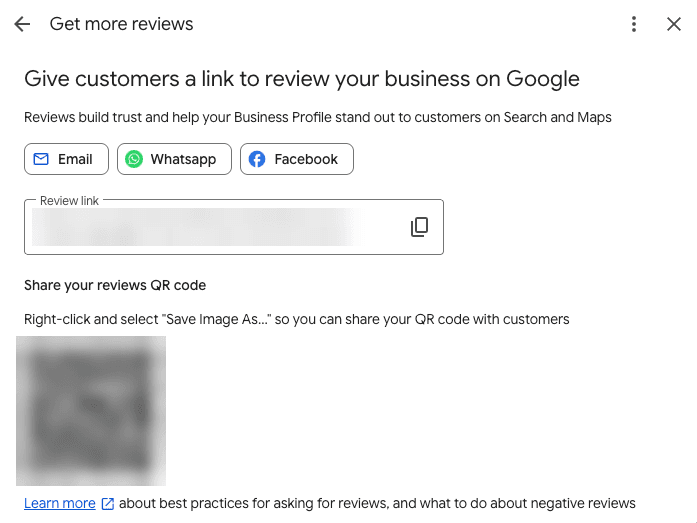
Text the link to every customer once the job is closed.
A text puts the link on the phone your customer already carries. With us, the text usually goes out within an hour of the job closing, and only during set hours. For the words to use, see what to say when you ask.
Follow up, then stop.
We recommend one request right after service and up to two gentle reminders. The follow-ups stop once the customer reviews. That timing is our practice, not a Google rule. Our guide lists other ways to get more Google reviews.
Reply to your reviews.
Google's tips page says to reply to reviews and share your perspective (Google's tips to get more reviews). Google checks each reply too. That usually takes up to 10 minutes, and sometimes up to 30 days.
Most review requests get ignored
A review request has to get noticed before it can get a review. So we put attention first. A plain text with a link can look like every other text on the phone.
Our review request text leads with a photo. The photo gets the customer's attention. Then the text asks for the review. See how it works.
Here's what lands on the customer's phone after the job:
- A photo of someone on your team holding a whiteboard with the customer's name on it.
- A request for a Google review.
- A link to your Google review page.
These are our own numbers, not figures from an outside study. Once your CRM is connected, the texts start. On average, the first new Google reviews come in about 48 hours after that. I built ReviewsOS for my own insulation company first.
About 30% of new customers typically post a review
Over 50% at some companies
35 Google reviews in 14 days, from past customers on my insulation company's first run
How long it takes for reviews to show on Google Maps
Google gives a time for each of these waits.
| What you're waiting for | How long Google says it can take |
|---|---|
| Google checks your verification (once) | Up to 5 business days |
| Google checks a new review against its policies | A few days, in some cases |
| Your review score updates | Up to 2 weeks |
| Google checks your reply | Usually up to 10 minutes, sometimes up to 30 days |
Times from Google's help pages on verification, missing or delayed reviews, review scores and managing reviews, checked on November 17, 2026.
Why a customer can't post a review
When a customer says the link didn't work, check these first.
- They aren't signed in. Customers must be signed in to a Google Account to leave a review (Google's tips to get more reviews).
- Their Maps app is old. Google recommends they update their Maps app to the latest version (Google's page on missing or delayed reviews).
- Reviews aren't offered for your business. Google offers reviews only in certain countries or regions and for certain business categories (Google's page on managing reviews).
Open your review link on your own phone first, to check that it works. Then text the customer back: "Thanks for trying! Sign in to Google, update your Maps app, then tap the link again." If you need a new link, make your free Google review link.
What Google allows and bans when you ask for reviews
Google lets you ask customers for reviews with a link or a QR code (Google's tips to get more reviews). The reviews must reflect a genuine experience (Google's help page on review links). Google's review policy, checked on November 17, 2026, bans these:
- Paying for a review, or offering a discount, free goods or a free service for one.
- Talking a customer out of a bad review.
- Reviews from someone with a conflict of interest. Google says that may include people who work for you now or used to.
- Fake engagement. Google removes it, and reviews removed for breaking its policies won't be restored (Google's page on missing or delayed reviews).
No fake reviews. We ask every customer the same way. See how it works.
Questions about Google Maps reviews
How do I find my reviews on Google Maps?
Search for your business name in the Google Maps app and tap Reviews. As the owner, you can also go to your Business Profile and select Read Reviews (Google's help page on review links).
How does a customer leave a review on Google Maps?
On Android, the customer opens the Google Maps app and signs in. Then they search for your business, tap Reviews and tap the stars (Google's steps for Android). The same help page has a tab for iPhone and iPad. Google offers a review link to make it easier for customers to leave reviews (Google's help page on review links). Make your free Google review link and text it to them.
Why can't I see reviews on my Google Maps listing?
First, check that your profile is verified. Google also offers reviews only in certain countries or regions and for certain business categories (Google's page on managing reviews). And in some cases, a new review waits a few days while Google checks it.
How do I remove a bad review on Google Maps?
You can report an inappropriate review from your Business Profile. Google says review evaluation typically takes several days (Google's page on reporting reviews, checked on November 17, 2026). If a flagged review doesn't qualify for removal, you can submit a one-time appeal. You can also reply to the review and share your perspective (Google's tips to get more reviews). Our guide on what to do about a bad Google review has the full steps.
Can you get paid to leave Google Maps reviews?
No. Google's policy bans reviews that were paid for, directly or in kind (Google's review policy). Local Guides is Google's program for people who write reviews. Each contribution earns points (Google Maps Local Guides). Its page doesn't mention pay.
How many reviews do I need to rank on Google Maps?
Google doesn't name a number. Its ranking page says how many reviews you have is part of prominence, as in the table above. To raise your star score, the count you need depends on the reviews you have now. See how many 5-star reviews it takes to raise your rating.
Sources
- Understand review scores for local places & businesses, Google Business Profile Help, read November 17, 2026
- Get Listed on Google: Google Business Profile, Google, read November 17, 2026
- Find your business on Google, Google Business Profile Help, read November 17, 2026
- Add, edit, or delete Google Maps reviews & ratings (Android), Google Maps Help, read November 17, 2026
- Tips to improve your local ranking on Google, Google Business Profile Help, read November 17, 2026
- Verify your business on Google, Google Business Profile Help, read November 17, 2026
- Manage customer reviews, Google Business Profile Help, read November 17, 2026
- Manage your service areas for service-area & hybrid businesses, Google Business Profile Help, read November 17, 2026
- Create a Google link or QR code to request reviews, Google Business Profile Help, read November 17, 2026
- Tips to get more reviews, Google Business Profile Help, read November 17, 2026
- About missing or delayed reviews, Google Business Profile Help, read November 17, 2026
- Prohibited & restricted content (Maps User Generated Content Policy), Google, read November 17, 2026
- Google Maps Local Guides, Google, read November 17, 2026
- Report inappropriate reviews on your Business Profile, Google Business Profile Help, read November 17, 2026
- We Analyzed 8,186 Businesses in 200 Cities. Here's What Actually Gets You Ranking for "Near Me" in 2025, Sterling Sky with Places Scout, published November 5, 2025: the top 10 local results for five "near me" searches (plumber, HVAC, locksmith, garage door repair, lawn care) in 200 cities, a correlation study, read November 17, 2026
We’ll get you 10 Google reviews for free to prove it works.
We start with the customers you've already served.
No card needed, First reviews in 48hr, 15-min setup call
Or see it first: get the text your customers will get.