Photo review requests
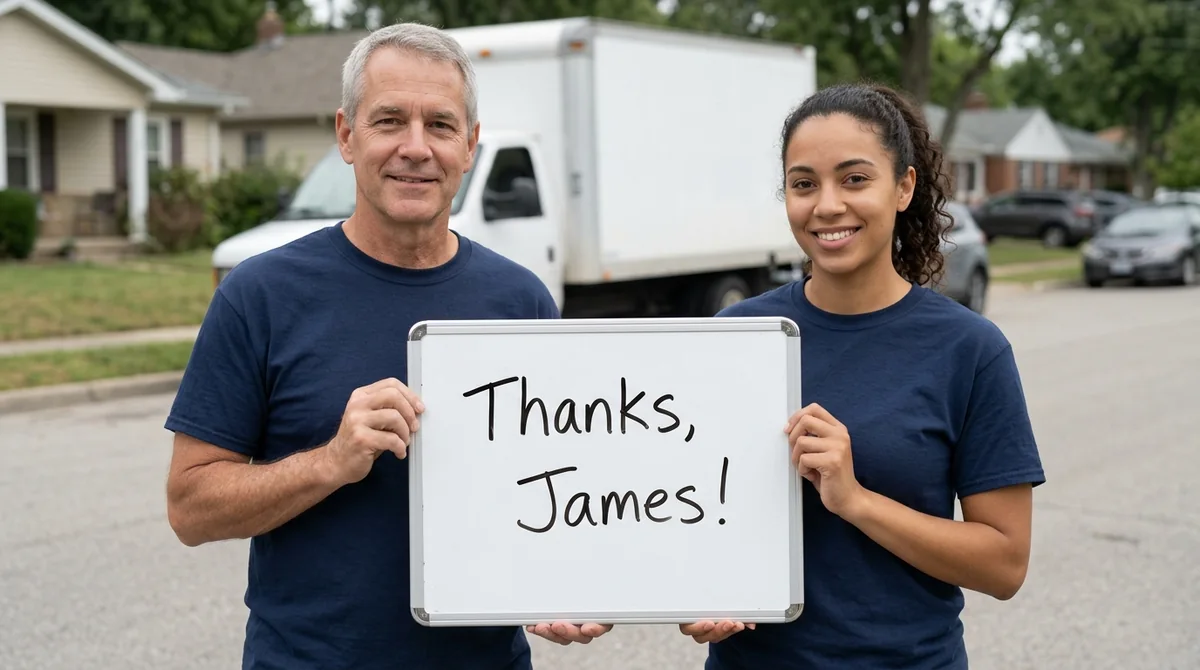
A Google review request with your customer's name on a whiteboard
Your customer sees their own name on a whiteboard, held by someone from your company. A short ask and your Google review link come right after.
No card needed, First reviews in 48hr, 15-min setup call

A Google review request is a message with your Google review link. You copy that link from your Business Profile (Google's help page on review links, checked on November 18, 2026). ReviewsOS sends it by text after each finished job. The text leads with a photo of someone on your team holding a whiteboard with the customer's name.
Promised 5 stars at the door, still no review
At the door, the customer says "I'll give you 5 stars." Then they get busy and forget.
Each forgotten promise is a review you don't get. Google says more reviews and positive ratings can help your local ranking (Google's local ranking tips, checked on November 18, 2026).
So you send a review request. Most automated review texts send the same sentence and review link to everyone. We see it this way:
Most review requests get ignored.
What your customer sees on the phone
Our review request text lands like this, from top to bottom:
- The photo. Someone from your company holds a whiteboard with the customer's name on it.
- The ask. A short line that asks for a Google review, for example: Hi Sarah! Would you mind leaving us a review?
- The link. It opens your Google review page. Your company's name stands at the start of the link.
From there, the review is up to the customer. Google says a customer who reviews a service business may be asked to choose the service provided (Google's page on managing reviews, checked on November 18, 2026).
Why the photo comes before the ask
Our text gets the customer's attention first. Then it asks for the review.
It opens with someone from your company and the customer's own name. Most texts on their phone don't look like that.
The photo only gets attention. It doesn't ask for five stars or tell anyone what to write.

“A picture with their name on it is an attention grabber. It breaks the pattern and wakes them up. It's a battle for attention, and regular texts asking for reviews just don't get read.”
Yahav Caine, founder of ReviewsOS
No outside study we found compares photo texts with plain ones. The numbers below are our own.
About 30% of new customers typically post a review
Over 50% at some companies
About 48 hours on average until the first new Google reviews, once the texts start
The one photo you send us
You send us one photo. We add the whiteboard and write each customer's name on it, so every customer sees their own name.
I built ReviewsOS for my own insulation company first. There, each location's general manager is in the photo, standing by the truck.
To try it, put a customer's name on your own photo with our free image maker.
Here's what to send:
- One clear photo.
- Your company's brand in it, like the company shirt or the truck.
- You, someone on your team, or the team together.
How each request goes out after a job
- Job marked done. In your CRM, the way your team closes jobs today.
- Text sent. Usually within an hour, and only during set hours, never in the middle of the night.
- Up to two reminders. Gentle ones, only if they haven't reviewed yet.
- Reminders stop. Once the customer reviews, the follow-ups end.
ReviewsOS works with all the major CRMs, such as Jobber, Housecall Pro, ServiceTitan, QuickBooks and more. Anything else that can send a webhook or connect through an API works too. See which CRMs connect.
With automated review requests, nobody on your team has to remember to ask. Read how every finished job sends a request.
Past customers can get the same photo text too, a few at a time. At my own insulation company, the first run went to past customers and brought 35 Google reviews in 14 days. See how to get your first reviews from past customers.
Sending a Google review request yourself
You can also request a Google review by hand, for free. Steps 1 and 2 follow Google's help page on review links, checked on November 18, 2026.
Copy your Google review link.
Go to your Business Profile and select Read Reviews. Select Get more reviews, then select Copy. Or make your Google review link, free.
Send the link to your customer.
Google suggests receipts, thank-you emails, the end of a chat and a printed QR code. It also names email, WhatsApp messages and Facebook posts. We'd send it by text after the job. Right now, Google's review QR codes can only be made in a computer browser, not on a phone. Our free QR code maker makes one too.
Follow up, then stop.
We recommend one request right after service and up to two gentle reminders. Stop once they review. The Google pages we read set no rule on reminders. Our guide has more on getting Google reviews by text.
Here's how sending it yourself compares with our photo text.
| Sending it yourself | ReviewsOS (ours) | |
|---|---|---|
| What the customer sees first | Usually a sentence and a link | A photo with their name on a whiteboard |
| Who sends it | Whoever remembers, by hand | It goes out on its own when the job is marked done |
| Reminders | You send them and check who reviewed | Up to two, and they stop once the customer reviews |
| Cost | Free | $150 a month for up to 100 review requests |
We make ReviewsOS.
What Google allows and bans when you ask
No fake reviews. We ask every customer the same way. Our guide has the full list of what Google bans. These are the main lines from Google's review policy, checked on November 18, 2026:
- Ask for reviews of real jobs. A review has to reflect a genuine experience.
- Never offer anything for a review, good or bad: no money, discount, free product or free service.
- Don't pressure anyone to review you, and don't ask for five stars or for certain words.
- Never talk a customer out of a bad review.
What the photo text costs
$150 a month covers up to 100 review requests. If you send more than that, talk to us. A reminder doesn't count as one of the 100.
Your first 10 Google reviews are free, and we don't ask for a card. There's no annual contract, and you can cancel anytime. Setup is one 15-minute call. See pricing.
Questions about photo review requests
How do I politely ask for a Google review?
Thank them, by first name if you can. Keep the ask short, send the link, and don't push. Our free link maker has what to say when you ask. In our text, their name on the photo comes before the ask.
Do customers need a Google account to leave a review?
Yes. Customers must be signed in to a Google Account to leave a review. They can set one up with an email address that isn't Gmail (Google's tips to get more reviews, checked on November 18, 2026). Google also says reviews are only available in certain countries or regions, and for certain business categories (Google's page on managing reviews).
Do I need a real whiteboard?
No. We add the whiteboard to your photo for you. If you'd rather take the photo with a real whiteboard, that works too. Either way, we add each customer's name.
Will my customers get my CRM's review text too?
No. On the setup call, we turn off your CRM's own review request together with you, so nobody gets two. Have someone with admin access to your CRM on the call.
Who gets the text after a job?
The customer on the job record in your software. That's usually the person who pays, and usually the one who leaves the review.
Sources
- Create a Google link or QR code to request reviews, Google Business Profile Help, checked on November 18, 2026
- Tips to improve your local ranking on Google, Google Business Profile Help, checked on November 18, 2026
- Manage customer reviews, Google Business Profile Help, checked on November 18, 2026
- Prohibited & restricted content (Maps User Generated Content Policy), Google, checked on November 18, 2026
- Tips to get more reviews, Google Business Profile Help, checked on November 18, 2026
We’ll get you 10 Google reviews for free to prove it works.
We start with the customers you've already served.
No card needed, First reviews in 48hr, 15-min setup call
Or see it first: get the text your customers will get.